Sunday, January 28, 2018

Hard Reset Samsung Galaxy C5 to Remove Forgotten PIN and Pattern Lock

Hard Reset Samsung Galaxy C5 to Remove Forgotten PIN and Pattern Lock.

Hard Reset Samsung Galaxy C5. This guide below will show you how to hard reset on Samsung Galaxy C5 smartphone device to remove forgotten PIN and pattern lock. Hard reset will bring your Samsung Galaxy C5 device to factory settings. You can use this guide to fix or remove forgotten PIN or pattern lock on your device. On this case youve tried to guess PIN or pattern lock many times but still failed. Of course you cant do anything to your device at this state. Sometimes its very annoying for some people who dont know how to fix it. But dont worry if you find this guide. Now let we know detail specifications of this Samsung Galaxy C5 device.

This device released at 2016, May. With 5,2 Inchi Super AMOLED capacitive touchscreen, 16M colors display. Powered by Octa-core (4x1.5 GHz Cortex-A53 & 4x1.2 GHz Cortex-A53), Qualcomm MSM8952 Snapdragon 617, Adreno 405 GPU. Run on Android OS, v6.0.1 (Marshmallow). Supported with 4000 MB of RAM, 16 MP on Primary camera, and 8 MP on secondary camera.

Hard Reset Via Software Menu.

Use this method only if you can access your smartphone menu.
  1. Make sure your battery has 80% of battery power.
  2. Now turn on your Samsung Galaxy C5.
  3. Then, go to the apps drawer.
  4. Then tap settings on your Samsung Galaxy C5 screen menu.
  5. Now on the next screen, scroll down until you see backup and reset. then tap it.
  6. Next step, tap Factory data reset.
  7. Then, tap Reset Device Button to start hard reset on your Samsung Galaxy C5.

Factory Reset Via Hardware Key.

  1. Battery status must be fully charged or has at least 85% of battery capacity.
  2. Back Up all file and data stored in internal memory, if possible.
  3. Now, turn off your Samsung Galaxy C5 device.
  4. Then, press and hold a 3 combinations key which is located on your Samsung Galaxy C5 body . These keys are.

    • Power Button + Volume Up Button + Home Button.
    Hard Reset    Samsung Galaxy C5
    Hard Reset Samsung Galaxy C5
  5. Now release Power Button only when your Samsung Galaxy C5 show Samsung Galaxy C5 logo on screen.
    Samsung Galaxy C5 logo
    Samsung Galaxy C5 logo
  6. Then release all button if you see white Android logo appear on screen.
  7. Wait a minute until Samsung Galaxy C5 enter Android Recovery.
  8. On this screen you do the following step
    • Use Volume UP and Volume Down to navigate and highlight menu.
    • Use Power Button to confirm your selections.
  9. Now, Now highlight wipe data/factory reset.

    wipe data/factory reset - Samsung Galaxy C5
    wipe data/factory reset - Samsung Galaxy C5
  10. Then highlight and select yes.
  11. Now, wait a minu te until data wipe process is complete.
  12. Once it complete you will see a notification at below of your Samsung Galaxy C5 screen that say data wipe complete.
    data wipe complete - Samsung Galaxy C5
    data wipe complete - Samsung Galaxy C5
  13. At the end of step, now highlight reboot system now to reboot your Samsung Galaxy C5 device.
  14. Finish.

Flash Bricked Bootloop LG G3 LG VS985R Verizon Wireless Using LG Flash Tool KDZ method Guide

Flash Bricked - Bootloop LG G3 (LG VS985R Verizon Wireless) Using LG Flash Tool (KDZ method) [Guide].

Flash LG G3 (LG VS985R Verizon Wireless). LG G3 (LG VS985R Verizon Wireless )  is the android smartphone which announced in May 2014 and exactly released on 2014, June. Guidebelajar on this guide will explain to you how to flashing android device on LG G3 (LG VS985R Verizon Wireless )  with an easy and simple stepFlashing in android is the same way like a fresh install on the windows PC, So by performing a flash on Android, you will give a new performance like a new phone. One reason that you should perform a flash your android is because your android gets a boot loop or when you failed to install Stock ROM Mod. 

This LG G3 (LG VS985R Verizon Wireless ) is the smartphone with 5,5 ITrue HD-IPS + LCD capacitive touchscreen, 16M colors, work on Android OS, v4.4.2 (KitKat), upgradable to v6.0 (Marshmallow) and supported with Quad-core 2.5 GHz Krait 400 CPU, Qualcomm MSM8974AC Snapdragon 801 chipset, combined with 2 GB of RAM and 13 MP of  Main camera and 2,1 MP on secondary camera. 

Now, follow the instruction list bellow, do it with your own risk.

Requirement Tool For Flash LG G3 (LG VS985R Verizon Wireless ).

Before you perform flash or install your firmware on LG G3 (LG VS985R Verizon Wireless ),
you must download all requirement tool below;
  1. Download Stock Rom LG G3 (LG VS985R Verizon Wireless ).
    • This S tock is KDZ file, remember to copy this KDZ file into LG Flash Tool 2014 folder
    • Check the firmware that matches with your phone version, below;
      • VS98524B_01
      • http://csmgdl.lgmobile.com/dn/downloader.dev?fileKey=FW9919F1326IAET121814KD/VS98524B_01.kdz
      • VS98535B_00 
      • http://csmgdl.lgmobile.com/dn/downloader.dev?fileKey=FW5EEB7232L2ATO02223HOO/VS98535B_00_ARB00.kdz
      • VS98524B_01 
      • http://csmgdl.lgmobile.com/dn/downloader.dev?fileKey=FW9919F1326IAET121814KD/VS98524B_01.kdz
    • Download Driver LG:  
    • http://click.xda-developers.com/api/click?format=go&jsonp=vglnk_144651256212410&key=f0a7f91912ae2b52e0700f73990eb321&libId=igio4xmg01000n4o000DA4nswvlb0&loc=http%3A%2F%2Fforum.xda-developers.com%2Fsho   wthread.php%3Ft%3D2797190&v=1&out=https%3A%2F%2Fwww.androidfilehost.com%2F%3Ffid%3D24052804347802528&ref=https%3A%2F%2Fwww.google.co.id%2F&title=LG%20Flash%20Tool%202014%20-%20The%20best%20way%20to%20Flash%20L%E2%80%A6%20%7C%20LG%20G2%20%7C%20XDA%20Forums&txt=https%3A%2F%2Fwww.androidfilehost.com%2F%3Ffid%3D24052804347802528
    • Latest LG FlashTool:  
    • http://click.xda-developers.com/api/click?format=go&jsonp=vglnk_14465125477179&key=f0a7f91912ae2b52e0700f73990eb321&libId=igio4xmg01000n4o000DA4nswvlb0&loc=http%3A%2F%2Fforum.xda-developers.com%2Fshowthread.php%3Ft%3D2797190&v=1&out=http%3A%2F%2Fwww.mediafire.com%2Fdownload%2Ffwrcd3pdj0svjtb%2FLG_Flash_Tool_2014.zip&ref=h   ttps%3A%2F%2Fwww.google.co.id%2F&title=LG%20Flash%20Tool%202014%20-%20The%20best%20way%20to%20Flash%20L%E2%80%A6%20%7C%20LG%20G2%20%7C%20XDA%20Forums&txt=http%3A%2F%2Fwww.mediafire.com%2Fdownload%2Ffw..._Tool_2014.zip

    #1. Guide To Flash LG G3 (LG VS985R Verizon Wireless )

    Please follow this guide carefully to flash LG G3 (LG VS985R Verizon Wireless ).
    1. Make sure you have download all requirement tool above
    2. Then Install the drivers with your phone connected to your Computer, when it finished disconnecting your LG G3 (LG VS985R Verizon Wireless ) phone from your computer.
    3. Now turn your LG G3 (LG VS985R Verizon Wireless ) phone off, then continuously click on the volume up button and connect your phone to your PC, 
    4. Now, enter your LG G3 (LG VS985R Verizon Wireless ) into download mode.  ( visit this guide)
    5. Run LGFlashTool2014.exe.
    6. If you cannot run LGFlashToo2014.exe, You must install Visual C++ Runtime Library, 
    7. There are two options to flash your LG G3 (LG VS985R Verizon Wireless ).
      • Normal Flash: You can select this option if you want Flash ROM without losing any data. Only use this when you need to fix system error.
      • CSE Flash: You can choose this option when you need a fresh format. All data will be deleted. Its suitable for upgrading or downgrading ROM or simply use this when you need to back to Stock.
      • LG flash tool normal flash / CSE flash
        LG flash tool normal flash / CSE flash
    8. Select Type: CDMA
    9. PhoneMode: DIAG
    10. Select KDZ file:browse your KDZ file in your drive
    11. Then you can Click on Normal Flash or CSE Flash (see step 7 to decide this option)
    12. Then click Start.
      LG flash tool - start
      LG flash tool - start
    13. Then click on Clear Phone Software update r egistry.
      Lg flash tool - Clear Phone Software update registry.
      Lg flash tool - Clear Phone Software update registry.
    14. No need to choose desired language, it automatically change to English as a default setting.
    15. Finally you can click OK.
    16. You must wait a minute for the LG Mobile Support tool to recognize the LG G3 (LG VS985R Verizon Wireless )  device.
    17. When you wait this process, may take 5 minute the tool to recognize it.
    18. The software will start the extraction on your device.
    19. When the process reach 100% your LG G3 (LG VS985R Verizon Wireless )  will reboot.
    20. Then, you must Unplug your LG G3 (LG VS985R Verizon Wireless )  from your computer by remove USB Cable from it.,
    21. Finish,

    #2. Guide To Flash LG G3 (LG VS985R Verizon Wireless )

    If #1 method is failed to flash your LG Android device, you can use this second method, flashing LG device using R&D Test Tool
    http://blogspot.com/2015/12/guide-to-flashing-lg-kdz-firmware-r-and-d-test-tool.html

    Saturday, January 27, 2018

    Weekly poll results Xiaomi Mi 6 overwhelmingly loved

    Among murmurs of “where’s the headphone jack”, fans heaped praise on the Xiaomi Mi 6. With nearly 80% of the votes - that is 4 in 5 people in favor - the affordable flagship has what it takes to become a hit.

    At its €400 or so price, the dual camera and Snapdragon 835 chipset (with memory to spare) are a huge plus. The curvy design is liked, though not quite cutting edge compared to some bezel-less offerings (which cost a good deal more).

    As for the headphone jack, Xiaomi had the foresight to include a small adapter cable and that seems to be enough for many. The company did not include headphones in the retail box, but no one complained about that (Mi 6’s price allows it to sidestep the demand for accessories).

    Now, if only Xiaomi could do something about the global availability of the Mi 6 - Mi.com is still only showing the 5s generation.

    ! ( hope useful)

    How to unbrick Install Stock Rom on Server L1

    Official Rom for Server L1-
    Stock Rom now available for Server L1, In this article we will Show you How to Install official Rom on Server L1,
     
    Step by Step Guide to Download and Install Stock Rom on Server L1,this Is a Latest official Stock Rom/ Firmware/ Flash file for Server L1come with Flash tool, Stock Rom and Driver So you can Easily Flash the Rom via Sp flash tools, Flashing the Rom Via SP Flash tool will Erase all your Personal data and you are back on Stock So create a back up Before Flashing The Rom,Follow Below Guide to install official Rom on Server L1,
    Firmware Details-
    Device-  Server L1
    OS- Android 5.1
    Chipset- Mediatek MT6735M
    Language- English/multi
    Gapps- included
    Root Access- Not
    Note-
    • This ROM/Recovery is work on Listed Device only. Don’t try this on any other device.otherwise it cause bootloop,
    • Follow the steps correctly otherwise you may brick your device. We are not responsible for any damage to your phone.
    • It will erase all you r data, so we advise you first to take a complete backup of your phone and then proceed.
    • Ensure that your phone has at least 50-60% charged to prevent the accidental shutdown in-between the process
    Download tools to Install Stock Rom on Server L1-
    File Name Downloads
    SP flash tools V5.2XX Download
    Stock Rom Server L1 Download
    Vcom Driver [Latest] Download
    How to Install Stock Rom on Server L1-
    Step 1.Download SP flash tools from above link and extract in a folder.{you can Extract on Desktop For Batter navigation,

    Step 2.Install correct adb and Vcom Driver in your PC from above link[wrong Driver installation cause failure]

    Step 3.Download[Tools, Rom, Recovery Etc} from above for your device and extract in a folder.

    Step 4.Go to extracted SP tools folder and Run SP flash tools exe file.{extracted In Above Steps]

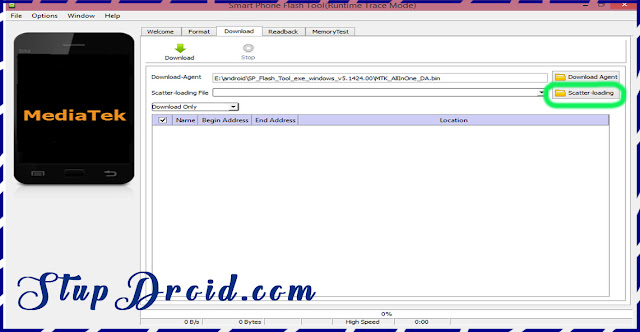
    Step 5.in SP tools go to Download tab and click on load scatter file and select scatter file from stock Rom folder.
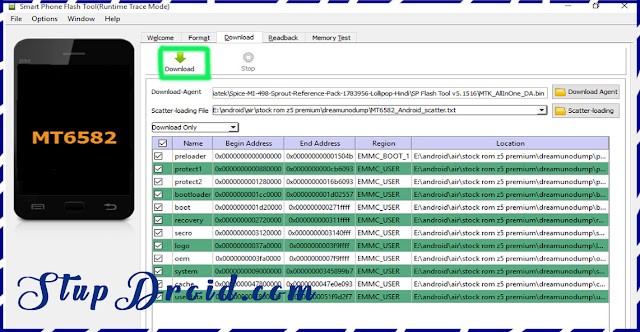
    Step 6.select what you want flash, Select Whole Rom {in custom Recovery case Check Recovery Only}

    Step 7.Remove battery of your phone and click on download button and immediately connect your smartphone into PC using usb.{if Not Detect then insert battery and connect}
    Step 8.wait while flashing is complete it take a few minut to flash af ter success.insert battery and you are done switch on your smartphone.
    So This is the Complete Guide to Install Stock Rom on Server L1 if you have any question Let Us Know Via Comment,
    Read also-
    • Best Bass Earphone for This Device
    • How to repair IMEI on Qualcomm Devices
    • How to Port twrp for MT67XX Devices [without Source] 
    Search tag- Stock Rom for Server L1, flash file for Server L1, Rom download for Server L1, cara flash Server L1, rom install on Server L1, flashing gudie for Server L1, firmware download for Server L1 rom installation steps for Server L1, unbrick Server L1, hard reste Server L1,

    iPhone 7 Case VPR Hybrid Slim Fit Rubber Silicone Cover

    "
    iPhone 7 Case, VPR Hybrid Slim Fit Rubber Silicone Cover discount

    • #1950472 in Cell Phone Accessories
    • Color: RoseGold
    • Brand: VPR

    Features

    • Compatible with iPhone 7 (2016).
    • Protect your phone with this modern, functional, and sleek kickstand case.
    • Hidden slot for safe keeping of cash, credit card, or ID.
    • The bumper case features a soft rubberized interior for shock absorbance and an exterior polycarbonate removable back panel for tough drops, scratches and bumps; The raised bazel keeps your screen and camera from scratching or touching the ground.
    • Precise openings on the case to allow full access to al l ports and function buttons. Includes One Kickstand Case. 100% great fit guarantee!
    " "... »

    Friday, January 26, 2018

    Indigi Sporty Bluetooth Fitness Tracker SmartWatch Heart Rate Monitor

    "
    Indigi Sporty Bluetooth Fitness Tracker SmartWatch - Heart Rate Monitor discount

    • #3296438 in Cell Phone Accessories
    • Color: Silver
    • Brand: inDigi
    • Model: Umini
    • Dimensions: 1.00 pounds

    Features

    • MTK2502 chip + Double Bluetooth 4.0 / 3.0 mode: Compatible with both iOS and Android phones, functions are more powerful. | Synchronize outgoing and incoming call - Indigi Umini Smart watch can synchronize incoming and outgoing calls from smart phone, you will not miss any important call at any time.
    • Heart Rate monitor - Indigi Umini equipped with Built-in heart rate sensor which can read your heart rate from your wrist. | Pedometer - Turn on pedometer to control and monitoring your sport motion, Including walking distance, step counters and calories.
    • Rimless fit screen sensitive keys wire-drawing metal case Heart rate, Bluetooth headset, and sports bracelet perfect combination Elegant and comfortable leather strap
    • Record activity and calories burned throughout the day to keep abreast of sports achievement | Caller ID + removal answer, earmuffs models meet different needs of customers
    • Light up screen when you hand up - Unlike other smartwatch, when you need watch the time, no need press the button, only raise your hand, the watch screen will automatically light up. Convenient and user-friendly.
    " "... »