Thursday, May 11, 2017

How to copy a picture from a message to your Samsung Galaxy S2

In this guide I will be showing you how to save those images from picture messages onto the internal memory of your phone. This is something that comes in handy for a number of reasons. The most obvious reason is that finding it through the Gallery is much each than scrolling through a long text conversation. Another issue is that there is a limit on the number of images you can store in one conversation and by default it is 20 (though can be changed to 5000) and it can slow the phone to scroll through a large number.

In the image to the right you can see an MMS with a picture of the country side. To start the saving process you need to hold your finger on it for a few seconds until a menu appears. Like the one you can see below/left to this short paragrap h.

When you see this pop up menu you need to click on "Attached items" which you can see clearly on the screen shot (the 3rd option down). After doing this you will see a list of all the attached items and their names. Each item will have a small tickbox as you can in the picture to the right. After you click in the box to tick the item (or items if there is more than 1 attached item) you will be able to click save and save it to your phone.

To find the item you will need to go to "Gallery" and then "download". You can then feel free to delete the message from your phone with out risking losing t he picture.

How to setup Broadband Internet connection on Windows laptop or PC

If by any chance your router does not have a working WAN port, you will have to directly connect the Ethernet cable to your PC or laptop for the broadband internet connection to work. Most routers today support high speed Wi-Fi so there is hardly any use for the LAN port except in offices where several desktops are in close proximity. To setup broadband internet on your Windows laptop or desktop via Ethernet cable, you will simply need to connect the cable to your PC and then setup a Broadband connection using the username and password provided by your Internet Service provider.


  1.  Connec t the broadband internet cable to your laptop’s Ethernet port
  2. Now you will see some blinking lights on the port, which tells you that the connection is working
  3. Now press windows key and search “network and sharing” and “select network and sharing center”
  4. Click on “Setup a new connection or network”
  5. Click “Broadband (PPPoE)
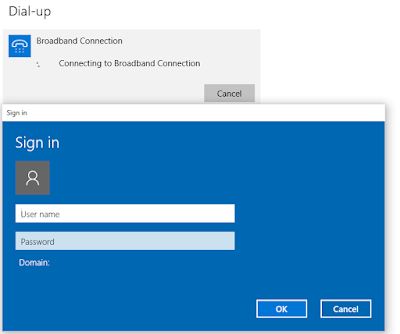
  6. Now type the username and password provided by your ISP (internet service provider)
    • You can also check mark “Remember this password” if you don’t want to login username and password after every reboot or shutdown
    • You can name the connection anything you like
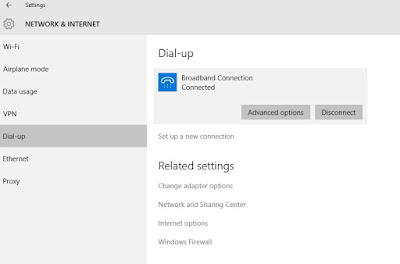
  7. Click “Connect” and your laptop will start connecting to broadband connection.


You should now be able to browse the internet. If you get connection failed error 651 or error 619, it means you have input wrong username and’;’p password
If the desktop icon on the bottom right of your laptop screen has a red cross on it, it means the connection has no internet.


Wednesday, May 10, 2017

GALAXY S6 EDGE WON’T POWER ON PROPERLY

GALAXY S6 EDGE WON’T POWER ON PROPERLY.

Hello people of Android! I have a Galaxy S6 Edge which I love and care for very much, but I have been having a large problem with it in the past few hours. When I went to go get a snack from my kitchen, I went to check my phone and it wouldn’t turn on. This scared me so I put it on my charger and waited as I took a shower. I came back and it seemed to have the charging battery logo but it wasn’t “filled” with green â€" which means it must’ve had a problem displaying battery or with holding a charge, since it was at 90% when this started to happen â€" but the odd thing is that the background that is supposed to be black, is black with blue horizontal stripes, which are in a design that did not seem like it was a problem with the screen. My solution was to hold the volume keys + the power button which brought me to a “Maintenance Boot Mode” menu. I proceeded to d o all but 2, which is factory reset in which I do not wish to do. This just brought me to a flashing “Galaxy S6 Edge” screen. One other thing that I forgot to mention, whenever I do any of this stuff involving the screen, the screen seems to turn on and off over and over. I would love to get the S7, but I would have to wait until mid March to get that which is near a month without my phone. Thank you for helping. â€" Evan
Solution: Hi Evan. Keep in mind that oftenti mes, when a Galaxy phone like your S6 fails to boot normally regardless of reason, the only best fix is by doing a factory reset. If your phone no longer responds normally when you power it on, we’re afraid you’ve got to try factory reset.
The display problem you describe here may or may not be a totally separate problem. To determine if that’s the case, you need to turn the phone on normally first. If the screen works fine when the phone is turned on properly, a software glitch may have caused it.

Apple iPhone 6s review


Introduction

The more it changes, the harder it becomes to see the difference. And you know, its not about Apple and the iPhone at all. Its where the industry has been heading for a while now. In the race for screen size and pro cessing power, the major makers flagships are like pro athletes finishing within milliseconds of each other. To get an extra edge, manufacturers will go in lots of directions - such as water proofing, bigger and sharper selfies, wireless charging, curved or borderless screens, whatnot.
A certain type of players would rather lose than be in a crowd of winners. Others dont even play games they cant win. We guess we all know where Apple stands on this.
With a single iPhone a year - two as of late - Apple is the kid that skips classes but aces the tests. The wild card player that goes on to win the tournament. The team that doesnt play qualifiers but goes to the world cup.
Wouldnt we all do less and make more? There goes the iPhone 6S, off to a familiar start. The same on the outside but trying to pose as the most important iPhone since the first one ever released.
The new iPhone, being an S model, naturally comes with more power under the hood, but also brings the long awaited camera upgrade. The main camera now uses a 12MP sensor capable of 4K video recording as well as 1080p at 120fps, there is a brand new 5MP selfie camera too. And, its the same screen size and resolution but we think its exactly what Apple meant with "the only thing thats changed is everything".
The first iPhone heralded the arrival of capacitive displays and multi-touch technology. The iPhone 6S is the first to have 3D touch - a screen technology that recognizes different levels of pressure for an extra dimension of interaction with a device.
A late tribute perhaps to resistive screens, which Apple itself sent to their doom. Not a particularly scientific statement although resistive technology did rely on actual pressure to work. Good enough for anyone with a penchant for the dramatic.
But if we are to stick to the facts, the iPhone 6s isnt the companys first device with a pressure-aware display, the Apple Watch is. Plus, phones like the Huawei Mate S and the ZTE Axon mini do deserve at least a mention as well. Anyway, this only high lights the difference between Apple and the rest. Cupertino has the habit - and in all fairness, the capability - to pick a niche technology and make it mainstream.

So, the pressure aware display and improved imaging are the big news about the iPhone 6S. Weve pretty much come to take the next OS and chipset version for granted.
Sure, we all know better than to expect a memory card slot and access to the battery, but we just cant agree with Apples decision to stick with the 16GB option as base instead of 32GB, which is actually not offered at all. 4K videos and the live photos (with sound) will clearly need more space than before. Not only that but Apple is actually charging slightly more in Europe for the base version of its latest iPhone.

And we can pu t it down as a typical Apple quirk that they snubbed things like water resistance and wireless charging but somehow couldnt resist the selfie thing. Oh well, therell be more of those as we go. Our 64GB iPhone 6s is popping out of the box right after the jump.


Tuesday, May 9, 2017

HTC One M8 Problems Glitches Questions Errors and Solutions Part 38

HTC One M8 Problems, Glitches, Questions, Errors and Solutions [Part 38]

Aside from sending us an email you may also contact us through ourFacebook and Google+ social media accounts.
M8 Reset Window Keeps Appearing
ProblemHello my name is Taylor Brooke Forbord. I have had my HTC for a year now and I am very satisfied with it. Until recently my phone has a mini window that appears asking me to reset the device by holing up volume and the power button for 10secs. It happens all the time whether I am checking my email, texti ng, etc. It pops up and will only go away if I tap the power button once. When I hit home button it screenshots it. I checked all my recent apps and uninstalled them and I have never had this problem before with my other apps. Any suggestions I am trying not to factory reset my phone.
Solution: This could already be a hardware related issue, probably a faulty power button. You should however verify if this is a software related issue by backing up your phone data and doing a factory reset.
  • Press and hold the Power button
  • Tap Power off.
  • Press and hold the Volume Down key.
  • Press and release the Power key to turn the phone on.
  • Continue holding the Volume Down key.
  • Release the Volume Down key when the three Android images app ear on the bottom of the screen.
  • Press the Volume Down key twice to move the cursor from FASTBOOT to FACTORY RESET.
  • Press the Power key to perform the master reset.
If the issue persists then bring the phone to an authorized service center and have it checked.
M8 Not Working After Getting Wet
Problem: I have a htc one m8 I went to the pool it sank for five seconds then I said that nothing will happen I put it in my bag then  when I came back I found it vibrating and the screen is off I went to the pro he dried it and opened the phone and then it worked but after 30 minutes the screen opens and close suddenly and sometimes it works properly and closes again now its not working at all ,and the screen was not giving good resolution and the camera not working properly and I heard about rice solutio n but I said you could help me
Solution: Since your phone got dunked in water it’s likely that it has caused damage to some components inside your phone. You need to bring your phone to an authorized service center and have it thoroughly checked.
M8 Keyboard / Gmail Issues After Lollipop Update
Problem: Hello!!! I have some issues with my phone and I don’t know how to solve it.
  • Sometimes keyboard just doesn’t appear anymore if I would like to text. And then I have to do restart.
  • Gmail “unfortunately has stopped working”
My phone has android 5.0.1. And to be honest before updating everything run smoothly. I hope you can help me.
Solution: For the keyboard issue that your phone has this appears to be an issue with the software update of the phone. Most owners of this device who are experiencing the same problem say that installing a third party keyboard helps. Locking and unlocking your phone a few times also temporarily solves the issue. For a more permanent solution you should check for any new software u pdates that may be available for your phone that may address this issue.
For the issue regarding the Gmail app try clearing the cache and data of the app.
  • From any Home screen, tap Apps.
  • Tap Settings.
  • Sc roll to ‘PHONE,’ then tap Apps.
  • Scroll left to the ALL tab.
  • Tap the Gmail application.
  • Tap Clear Cache.
  • Tap OK.
  • Tap Clear Data.
M8 No Display After Phone Dropped
ProblemHello my wife dropped her phone and it got smashed. It was in an otter box and the screen is not cracked but the phone gets hot and it will not light up. You can still answer calls and hear people talking but you have to just guess at where the answer button is. What can I do? Is there anywhere I can send it? Or is it something I can fix? I have worked on iPhones but never an htc. Thanks
Solution: It looks like the display of your phone has been damaged. You should bring your phone to an authorized service center and have it checked. It’s very likely that the display will be needing a replacement.
M8 Unfortunately Messages Has Stopped Error
ProblemHi! I’m having a little trouble with my phone. It’s giving me this error “Unfortunately messages has stopped” every time I enter the text messages. Attached is a picture of the error. Hope you guys can help!
Solution: You should clear the cache and data of your messaging app to resolve this issue.
  • From any Home screen, tap Apps.
  • Tap Settings.
  • Scroll to ‘PHONE,’ then tap Apps.
  • Scroll left to the ALL tab.
  • Tap the Messaging application.
  • Tap Clear Cache.
  • Tap OK.
  • Tap Clear Data.
M8 MicroSD Card Files Missing
ProblemHi, I recently bought the HTC one m8, I put my 64g memory card in, and it worked perfectly fine, then after a few hours, I went through my pictures and music, and I had nothing there, it says no files, as if my memory card isn’t in, I take the memory card out and back in again, and it works, then the same, after a few hours, nothing again, I don’t know why this is happening or how to fix it, if you could help me please
Solution: This may be caused by a glitch in the phone software. You should try wiping the cache partition of your phone and see if this resolves the issue.
  • Press and hold the Volume Down key.
  • Press and release the Power key to turn the phone on.
  • Continue holding the Volume Down.
  • Release the Volume Down key when the three Android images appear on the bottom of the screen.
  • Press the Volume Down ke y once to move the cursor from FASTBOOT to RECOVERY.
  • Press the Power key to begin the wipe.
  • The device displays the bootup screen followed by a phone with a red triangle.
  • Press the Up Volume key and Power key at the same time.
  • Press the Down Volume key three times to select Wipe cache partition.
  • Press the Power key to initiate the wipe.
  • Wait until the phone displays Cache wipe complete.
  • Press the Power key to select Reboot system now.
If the problem persists then try using a different microSD card on your phone. If the issue does not occur then the microSD card you are using may have a problem.
M8 Randomly Activates Car Mode
ProblemFor about two days now my phone will go into car mode all by itself. I’ve tried disabling it by I can’t also I keep getting ads randomly popping up Whenever I wake my phone up. Our I’ll tap on an app and an ad will pop up. And then today my headphone jack will not work. I do not know if it’s hardware or software but I have read that’s it’s possible that the headphone and/or the usb port have dirt or other debris in them. Could you please confirm or possibly give other solutions. Thank you. also I have the HTC One M8 HK Running the most recent version o f lollipop.
Solution: Since your phone is getting pop up ads the best way to proceed is to start fresh. Back up your phone data then perform a factory reset.
  • Press and hold the Power button
  • Tap Power off.
  • Press and hold the Volume Down key.
  • Press and release the Power key to turn the phone on.
  • Continue holding the Volume Down key.
  • Release the Volume Down key when the three Android images appear on the bottom of the screen.
  • Press the Volume Down key twice to move the cursor from FASTBOOT to FACTORY RESET.
  • Press the Power key to perform the master reset.
Now check if the issues still occur. The car mode issue should be gone now. The headphone issue may still occur. If it does then try using a different pair of headphones that is known to work. If the issue persists then check the audio port of your phone for any dirt or debris and clean it with a toothpick.
M8 Vibrate Not Working
ProblemHi guys my htc one m8 vibrate just randomly stopped working while I was in the car not sure what happened I wasn’t changing any settings and I tried the HTC guide troubleshoot for vibration test and it still didn’t work thanks I hope its not a hardware problem cause this phone is 5 months old
Solution: If t he vibration test fails then you should try rebooting your phone. If the issue persists then this may be a hardware related problem most likely concerning the vibration motor. Bring your phone to an authorized service center and have it checked.
M8 Not Connecting To HTC Sync Manager After Lollipop Update
ProblemHi, Like many others after the Lollipop “upgrade” and AT&T’s update from March 2015, I was finding certain things not working, so far texts incoming and outgoing take about 6 seconds to register onscreen, LED light sort of works/blinks after recieving a call or text but seems dimmer than usual, LED light no longer comes on during charging and red LED is non existant during charging as well as green LED when charge is complete, had some problems seeing my home WiFi even though it is in the saved networks list, but no problem with work WiFi and thats intermitant. So I backed up my phone using HTC Sync Manager because I wouldn’t want to lose data right? then did a factory reset and “tada!” quite a few problems were gone and texts were lightening fast although the same problems with the LED still exist. The problem now is when I plug in the phone to my computer where all my backup info is, the HTC Sync Mgr. comes up, sees the phone, identifies it for a second and says “Loading Data”, does this for about a minute or 2 and then comes up with a message “Device unavailable, please reconnect your phone” although it is indeed connected and I haven’t moved it.I’ve seen this same problem posted on other sites but the posts are from 2014, and none of the solutions work. Any ideas on how I can get all of my back up info back onto my phone? Any info and help will be heartily appreciated. Thanks
Solution: Here’s how to solve the issue of your phone not connecting to the HTC Sync Manager.
Go to Settings > Security > then Check Unknown Sources.
Now perform these steps.
Start menu > File Manager > AndroidHtcSync2.apk (this file is located in the internal storage of your phone)> install
You should be able to connect yo ur phone to the HTC Sync Manager.

How to fix error 495 in Google Play Store on Android smartphones and tablets

The Error 495 is a Google Play Store error common among Android devices running older operating systems like Android 4.4 KitKat, 4.3 JellyBean and 5.0 Lollipop etc. This is the format of the error: "Facebook" could not be downloaded due to an error. (495). YouTube, Whatsapp and Viber are among the apps that are mostly affected by this error. The most effective fix for Google Play Store error 495 are mentioned below. There are several methods but each will take only few minutes and they’re very easy to follow:


How to Fix Google Play Store Error 495 during Android app download/install

Method 1: Clear Google Play Store cache and data

  1. Go to settings >> Apps >> All
  2. Scroll down and select “Google Play Store”
  3. Tap "Clear data”
  4. Repeat above steps to clear data for “Google Service Framework”


Method 2: Reset app preferences

This method will reset your app settings to default. It won’t delete app data.
  1. Go to Settings >> Apps (application manager)
  2. Tap the menu key or the three dotted settings icon
  3. Select “Reset app preferences”


Method 3: Che ck Background data settings

Make sure your background date is unrestricted. Many users who have turned this setting on to avoid data charges and that can later cause error 495 while updating or downloading apps in Google Play.

  1. Go to Settings >> Data usage
  2. Tap menu key or the three dotted menu icon on the screen
  3. Tap “Allow background data”
  4. Now you should be able to download/update app in Google Play


Method 4: Check Access location

  1. From your App drawer select “Google Settings”
  2. Go to Location and turn everything on.
  3. If that didn’t solve the error continue to steps below
  4. Install VPN app like Hideman VPN
  5. Now open the VPN app and reset your location to a different one (example- UK)
  6. Now you should be able to download apps from Google Play


Method 5: Uninstall Google Play Store updates

This method has also worked for many users. Here you will reset Google Play Store app to the stock or older version. The Play Store app will update automatically later online.
  1. Go to Settings >> Apps >> All
  2. Select “Google Play Store”
  3. Tap “Uninstall Updates” >> OK
  4. Launch Google Play and you should no longer get the error.
The last thing you can try is delete your Google account from settings and then add it back. Refer to this post: How to fix RPC-S :7:AEC error in Google Play Store.
 That has also solved error 495 for many android users. Do you have another fix for this issue? Drop a comment.

The problems with an iPhone 4

Although the follow up the the iPhone 4 appears to be just around the corner the current phone still seems to be selling well and is still one of the best phones available despite being almost a year old. Apple have brought out the newest version of the iOS (iOS 5.0) and it seems inevitable that a phone will be following. Although much debate rages whether it will be a proper upgrade (i.e. iPhone 5) or a variation of the iPhone 4 (i.e. iPhone 4S or iPhone 4G) the current phone is the one we will focus on here.

The big issue was (and still is) the well known "death grip" that caused a lot of noise when the phone was first released. The "death grip" caused the signal (and as a result calls) to suddenly vanish due to the way users held the phone. Apples unhelpful response was to tell users "Youre holding it wrong" (which, understandable annoyed customers) and never actually got properly sorted.
The cause of the death grip was holding certain parts of the phone, almost in a natural position as you would do for a call and it did lead to huge negative press for the company. Despite the "death grip" the phone sold well and Apple even managed to fleece extra money from customers by selling them a "Bumper case" just to try and prevent the signal loss. Effectively they asked for more money to make their very expensive piece of kit work properly rather than took a financial hit themselves and recall the unit.
The bumper case did solve the problem pretty well, especially for Apple, though it wasnt the only problem with the phone, it was, by far, the most embarrassing.

The camera, on release was also a major issue. It ranged from the virtual shutter just shutting and staying shut to an innate ability to make white appear yellow in indoor pictures. Whilst these issues have, seemingly been fixed since the early releases some people have still had issues with the camera in the past few months so just be aware of this if you do fancy getting one. It is also worth noting that the main Camera is just a 5MP one, and this is below what seems to be the standard for top phones at the moment (expect this to be upgraded when the next release is available).

Whilst the phone is a cracking handset that makes full use of a wonderful OS and wonderful hardware the phone is starting to show signs of its age (at last). As mentioned above the main camera is "only" 5MP (with the standard now set at 8MP) as well as just 512MB of RAM (this is on par with devices such as the HTC Wildfire S and the Samsung Galaxy S). If you are fancying getting an iPhone Id strongly advise waiting to see what they are to bring out. The device, although still having a high price tag, wasnt really the leap forward that many had hoped for and whilst it did add a number of nice new features its certainly not the phone that really "Changed everything", it just raised the bar and others have since raised it which is why its showing its age.